
VEIN Weekly: Broken Hotfixes

Hi everyone! Welcome to another VEIN Weekly. This has been an eventful and stressful week for us for sure, as we ended up breaking people's save games for around 24 hours due to an oversight with the engine upgrade. We'll go into detail about what happened in this weekly update.
5.6
We decided to upgrade to Unreal 5.6 from Unreal 5.4 due to rendering performance improvements and asynchronous level loading tech. We haven't implemented the patch's performance improvements yet, as we've been busy putting out fires from the hotfix. We still believe the upgrade is going to be net positive – in tests we've increased performance in some areas by 1.5x and there are promising improvements to reducing stuttering when moving quickly across the world. We know however many community members have actually reported worse performance from the patch. We're aware of this. We have a lot of work to do on this, but I'm confident we'll figure it out.
We've had similar problems with engine upgrades in the past. We started working on VEIN on Unreal 5.0 and upgraded through to 5.4, and there were various corruptions and issues along the way. All told, upgrading to 5.6 was actually one of the easier engine upgrades we've had. In the past we didn't have so many people playing the game, so there was less trouble about it when things went wrong.
How we save things
This might get a bit technical but bear with us.
In Unreal, things in the world have what's called a path name. You can think of this as a URL. They contain information about the level the thing is, what type of thing it is, and how it's stored in the level. Specifically, it contains:
- The package the thing is stored in
- The level it's in
- The type of thing (its "class")
- A random unique ID number for the thing in the level
- A timestamp of when the thing was first created
- Another unique ID number
- Its owner, if it is a part of something. For example, a car's headlights referring to the car.
Path names refer to things in the world, so we use them to connect save game data on disk to things actually in the world. Just like a URL points to a website's content, path names point to things in-game.
For dynamic things, like a crate you build, we can use a more efficient format than path names to refer to an object. As the crate's not in the world when the game starts before a save game is loaded, we can use whatever kind of identifier we want, so typically this is just a random very large number.
When we load an object from the game map files (let's say a cabinet already existing in the world), we will look at the save game to see if there's a record of it. If there is, we take the data in the save file and apply it to the box: that might be the box's contents, or if the box was destroyed already. For things like crates you build, it just spawns the crate in with the contents in the save file; for things like cabinets, it applies the data from the save file to the cabinet.
If we don't find the path name in the save data, nothing is applied to the furniture.
Hotfix 11
We tested this in both singleplayer and multiplayer, with and without save games. I took a cursory look around a standardized save I have, and everything seemed to load in OK. We also ran around in multiplayer and tried to cause problems, and everything seemed to run fine for everyone, so I figured it was fine to release the hotfix.
It turns out that Unreal 5.6 switched around the second ID number and the timestamp in the object path name format. Even now I have no idea why they did this, or what the motivation was, but because of that, save data in the save file wasn't being accessed when the game loaded. The cabinet which in 5.4 might have the ID Cabinet.123.456 would now be Cabinet.456.123, and not find that in the save file, so it would assume it's a fresh cabinet. The same happened to furniture: a couch would look up Couch.XYZ.ABC instead of Couch.ABC.XYZ and find nothing, and assume you haven't destroyed it yet.
So, because the stuff in my test save's base was all dynamic (workbenches, shelves, etc.) I didn't see any problems when we tested.
Naturally the reports came flying in and there were a lot of rightfully angry people, as nobody likes to lose hours and hours of progress.
Hotfix 12
Meanwhile there were a couple other issues, like the admin menu not opening in singleplayer. This is due to us changing how Steam authenticates you. Players would report that in multiplayer they would lose characters sporadically. We found the issue, which was to do with Steam not authenticating all players in time, and patched it.
However, this had the side effect of not bothering to authenticate players in singleplayer or players that were hosting a server (as it would be silly to disconnect you for not running Steam or being offline, etc. – VEIN isn't an always online game). If we didn't authenticate you, then we never set your admin status, and if we never set your admin status, you would be considered a regular player, even in singleplayer, and not have access to the admin menu.
We shot out Hotfix 12 to address it.
Hotfix 13
I wrote a quick hack to take existing save data during the world load, and swap the path names to the new 5.6 version.
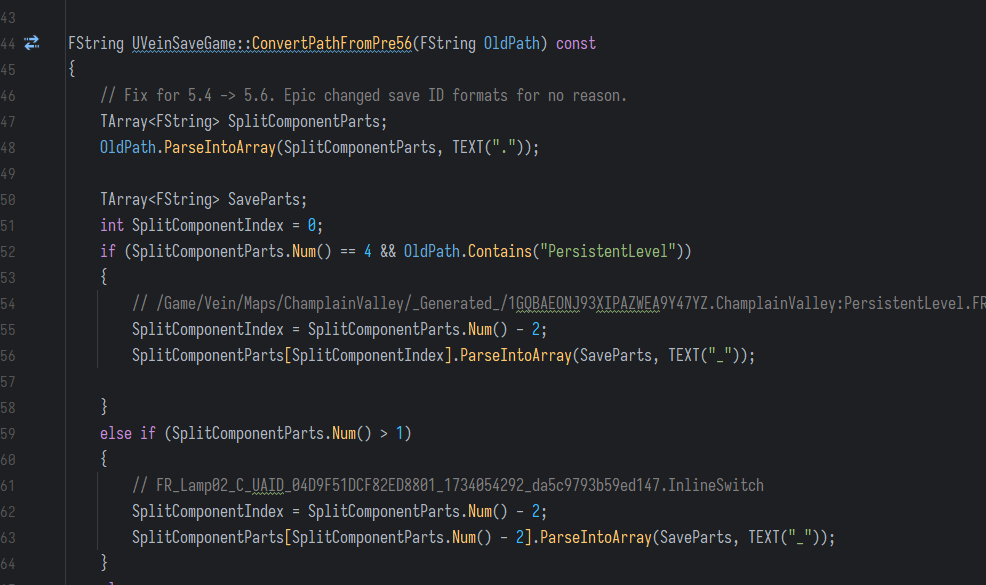
This worked pretty well and I tested quickly with no issues. Afterwards because we wanted to get it out ASAP, I shipped Hotfix 13.
Hotfix 14
People were reporting vehicles were defaulting back to their original locations, the power grid was resetting, and corpses were vanishing. In Hotfix 13, I added some de-duplication code to handle if a player had saved between Hotfix 11 and 13. If they had, they might have a new version of the cabinet in the save file, so after my conversion code above, they'd have two records of the cabinet.
I found a small bug in that code that would remove more records than it needed to from the save file, so I quickly patched that and shot out Hotfix 14.
Obviously we're very ashamed of all this. What should have been a really simple update caused a lot of problems. We sincerely apologize if we disrupted your play and hope you were able to recover some of your progress. It's a developer's worst nightmare to mess up save games.
What we're doing to prevent this in the future
- We're starting off by standardizing and automating how we test the game. This is going to take a while, but we need to do testing better. We're going to write automated checks on save game data and general gameplay systems. This is very difficult in game development compared to, for example, web development, because games are non-deterministic (they rely on randomness for many systems), which you can't easily test. However, the save game issues from Hotfix 11 should have been readily apparent to us, and could have easily been tested automatically. I've already implemented an automated testing system that will prevent this specific issue from happening ever again.
- We're fortifying the save game format for the next major game update. We're no longer going to be relying on path names for anything. All data in save games will be referred to by a static, stable ID. Your existing save game will be future-compatible, and you can be sure we're going to test the daylights out of this new system before sending it to you.
- We're splitting save files into multiple files. A save file will have separate component files (e.g. separate files for characters, for players, stuff in the world, etc.) This way, if something goes wrong with certain parts of the save file, it can be restored or fixed without damaging the rest of the save data.
- We're planning on implementing a human-readable save format option, so if there's something wrong inside the save data (e.g. a corrupted item or character or something), you can open it in Notepad and fix it. This isn't a huge priority for us right now though.
- We're not going to be upgrading Unreal versions without extensive and comprehensive testing in the future.
The above are now an immediate priority for us. Once these are done we'll be back to updates as usual.
Other issues from Hotfix 11
We're aware of multiple crashing issues from Hotfix 11. Many of these are to do with loading game data from disk, or cleaning up space in RAM. We're actively working on these, as many of the new crashes are all actually caused by the same thing.
Like I said above, we're also aware of several performance and load time issues reported by people on our Discord, on the Steam forums, etc. Some people have no issues, while others can't start the game. Again, we are working on these and hope to have a hotfix out sometime mid-month.
Linux users (and Steam Deck) users are seeing some graphical issues and crashes. We're going to be adding official Steam Deck support at some point in the new year as we start to buy development hardware.
Rollback
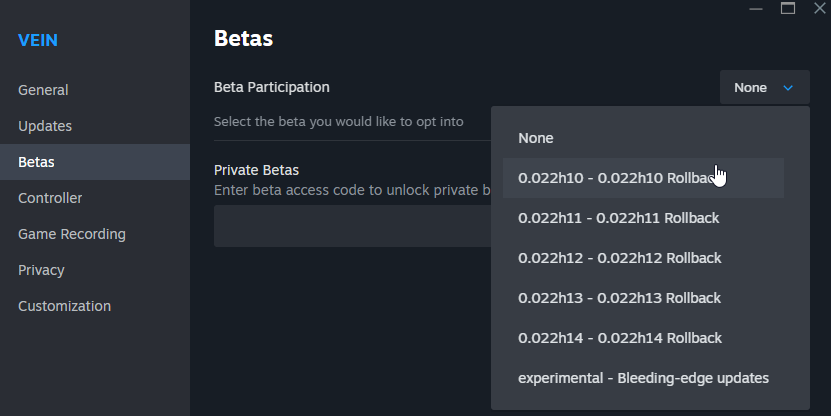
If you're having issues with Hotfix 14 and would like to roll back to Hotfix 10 and still have saves from then, we have a beta branch on Steam for 0.022h10.
To access it, right click on VEIN in your Steam library, click Properties, navigate to the Betas tab, and select 0.022h10. Steam will then update the game back to 0.022h10.
So to summarize, this week we've mostly been 1) dealing with Hotfix 11/Unreal 5.6 issues, and 2) working on systemic testing and save game fortification.
We'd like to apologize again for all this. It's never our intention to disrupt play or to cause a loss of progress. I'm embarrassed that it happened, and with any luck we'll get testing and preparation work in soon so that it's much less likely to happen again.
In other news, we'd like to welcome Yan to the team. Yan's an exceptionally talented and detail-oriented programmer who we're excited to have help out on the code side. Yan's currently helping out on the save game work. We're going to be continuing to expand the team over the next few months.
I've been working on reviewing the extensive amount of portfolios and CVs sent to us over the last couple years. If you're a developer who is interested in working on VEIN, especially if you're a 3D artist or animator, please feel free to send a portfolio link to hello@ramjetstudios.com.
In the meantime, Azi has been working on more balancing and loot economy work for the upcoming version 0.023. Item dismantling results continue to be polished and corrected. Trunks and glove boxes of vehicles will have more unique contents and more reason to be looted.
A new type of mineable geode is coming – crystal. This will be used in crafting glass and lenses for some new buildables and craftables. Cameras have been added to the build menu for version 0.023, and some recipes (e.g. binoculars) have been adjusted to include these. You can scrap it from things like jewelry. You'll be able to find crystal mining geodes in underwater caves.
I've fixed the issue on servers with melee hitting things multiple times in a row. This was due to an Unreal 5.6 code bug regarding animations. It'll be in the next hotfix. I've also fixed a couple multiplayer exploits for the next hotfix.
Thanks for reading, and see you next week!